
    Prices go up on January 1, 2027. Subscribe before then and keep today's price. How the price lock works
    Time Clock

    Every employee clocks in, and the hours land on the car

    Claimory Time Clock is a Marketplace add-on for collision repair shops on the Elite plan. Every employee clocks in and out from a phone or a shared shop tablet, and a technician clocks onto the repair order they are working, so the hours and the labor cost land on that claim without anyone typing them. Each employee who clocks in uses one seat, and Elite seats are unlimited.
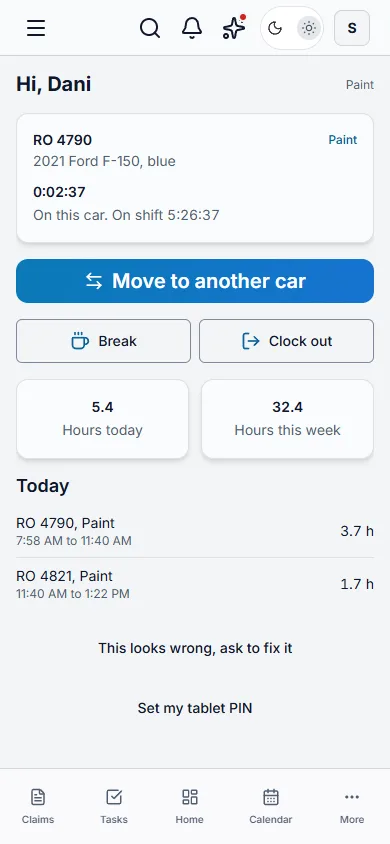
    My Clock in Claimory Time Clock on a phone: a painter on RO 4790, a 2021 Ford F-150, with the time on this car and on shift, a Move to another car button, Break and Clock out, 5.4 hours today and 32.4 this week, and today's punches by repair order.
    A day on the floor

    Tap a punch and watch the hours land on the claim

    In Claimory Time Clock, each time a technician leaves a car, the punch on that car closes and its hours land on the claim as labor, at the rate the shop set for that person. Below is an example day for a painter working two repair orders.

    Dani picks RO 4790 and Paint. Clocking onto a car starts her shift as well, and the clock now runs on that repair order.

    Picking the next car closes the punch on RO 4790 and opens one on RO 4821. The hours on RO 4790 land on that claim as paint labor.

    The punch on RO 4821 closes, and its hours land on RO 4821. Dani is back on the F-150.

    A break closes the punch on the car while the shift keeps running. Breaks are unpaid unless the shop sets them as paid.

    Ending the break puts Dani back on RO 4790, the car she left. Nothing lands on a car during a break.

    Clocking out closes everything still open: the punch on RO 4790 and the shift.

    RO 4790, 2021 Ford F-150

    • Dani Reyes 7:58 AM to 11:40 AM, Paint labor, 3.7 h at $38.08/hr Time ClockJust landed$140.90

    Example day with sample names, cars and rates. The rate is the person's pay rate plus the shop's burden percent.
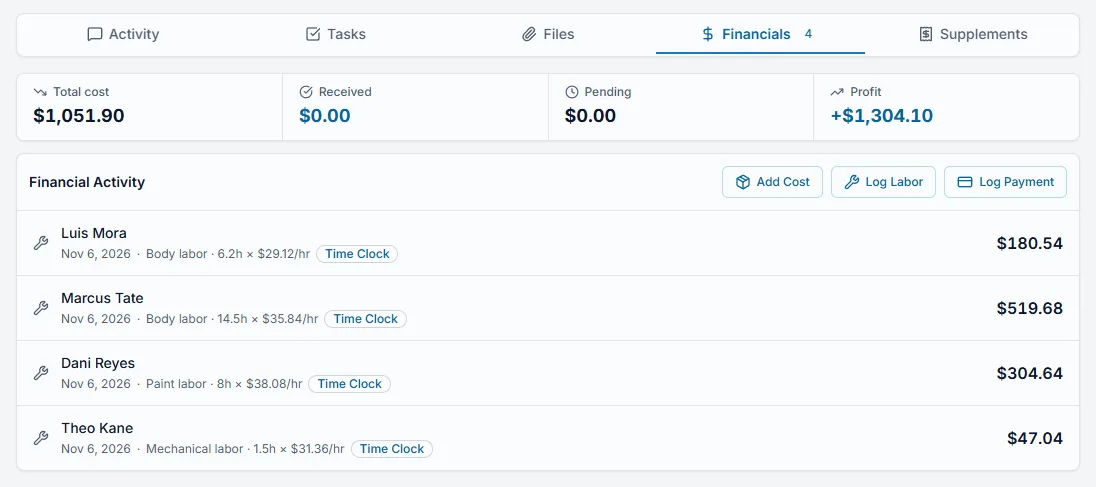
    The Financials tab of a claim in Claimory with labor rows written by Time Clock: each row names the technician, the date, the type of labor, the hours and the rate, carries a Time Clock tag, and adds its cost to the claim's total cost and profit.
    The real Financials tab on a claim. Rows from the clock carry a Time Clock tag, cannot be edited there, and count in the claim's cost and profit like any other labor.
    For managers

    Who is in, and on which car

    The Time Clock screen in Claimory opens on Who's In for managers. A shift left open past the shop's limit is flagged for review and never closed with a made-up time. A shift clocked out after that limit is marked Needs review, and its hours are not costed or approved until a manager fixes the time or confirms it. Every fix keeps who made it, when, the old time, the new time and the reason.

    Who's In
    Who is in right now, which repair order each technician is on and for how long, who is on a break, and any shift that may have been left open.
    Timesheets
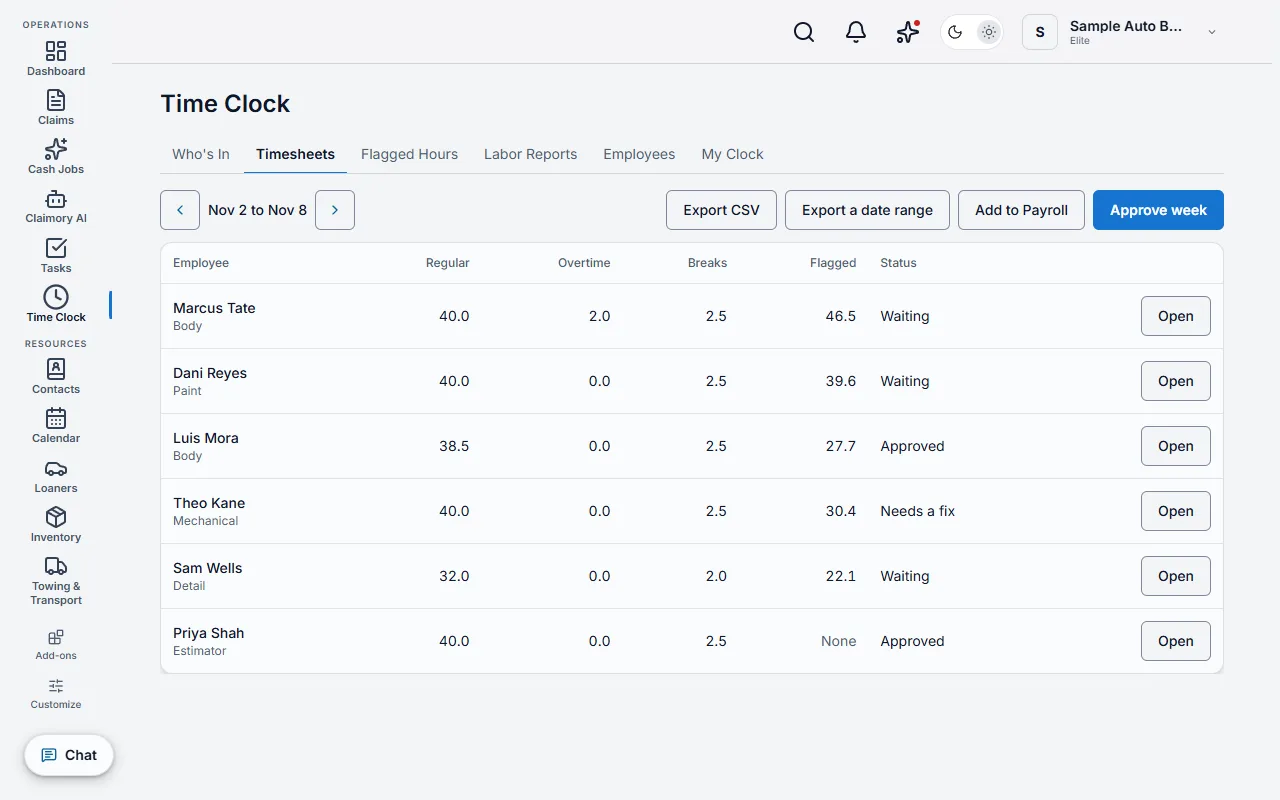
    Regular, overtime, break and flagged hours per employee for the pay period, with fixes, approval and export.
    Flagged Hours
    The labor hours on each claim's estimate, by type of work, waiting to be credited to the technicians who did the work.
    Labor Reports
    Efficiency, flagged hours over hours on cars, against a target the shop sets per trade, and productivity, hours on cars over hours on shift, by technician, trade and date range.
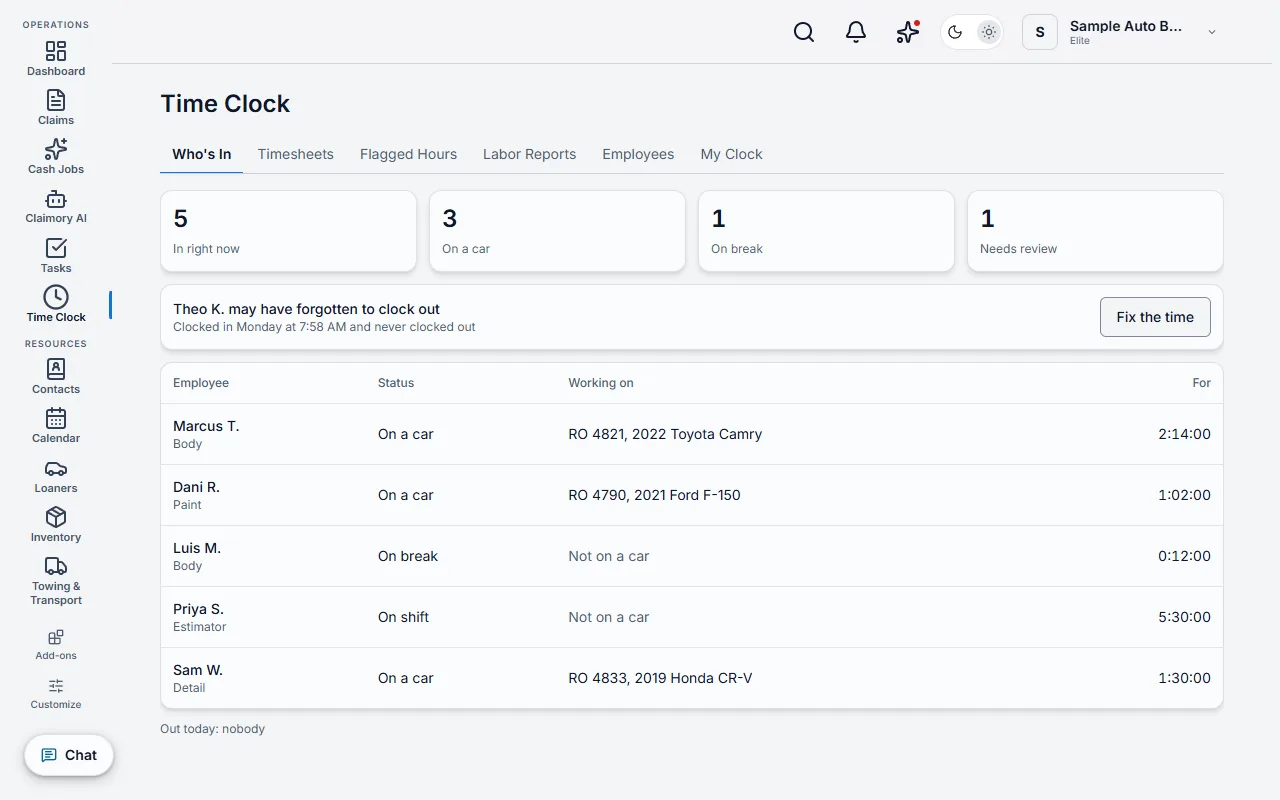
    The Who's In tab of Claimory Time Clock: counts of people in, on a car, on break and needing review, a notice that one technician may have forgotten to clock out with a Fix the time button, and each employee's status, repair order and time.
    Shop tablet

    One tablet by the door clocks the whole team

    A shared shop tablet paired with Claimory Time Clock lists the team by first name and last initial. An employee taps their name and enters their own 4 digit PIN, and five wrong tries lock that PIN for 15 minutes. There is no fingerprint or face scan, and no location tracking.

    The tablet only clocks people in and out and sends an employee's request to fix a time to a manager, and it opens nothing else in Claimory. A manager pairs it with a short code and can revoke it from settings, and a shop can require every punch to come from the tablet.
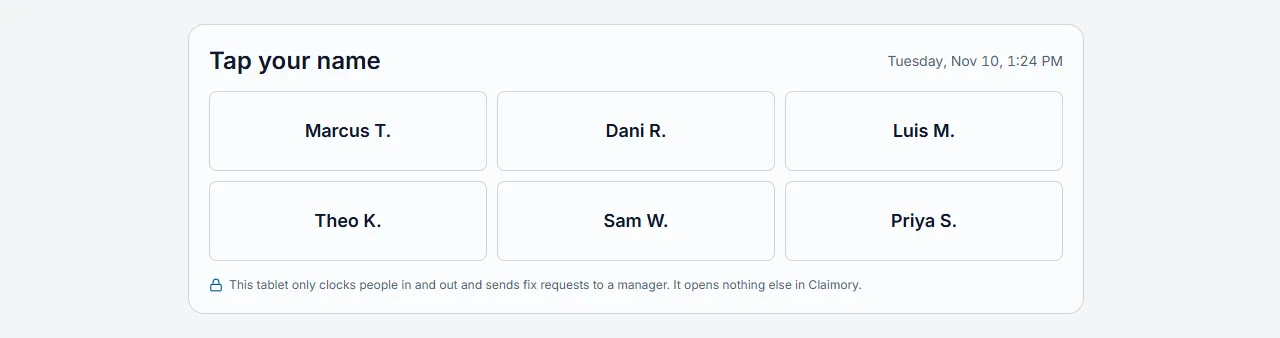
    The shared shop tablet in Claimory Time Clock: a Tap your name screen listing six employees by first name and last initial, the date and time, and a note that the tablet only clocks people in and out and sends fix requests to a manager.
    The Timesheets tab of Claimory Time Clock for one pay period: each employee's regular, overtime, break and flagged hours with a status of Waiting, Approved or Needs a fix, and buttons to export a CSV, export a date range, add to payroll and approve the pay period.
    Pay periods

    Approve the pay period, then hand it to payroll

    Claimory Time Clock totals each employee's hours for a weekly or biweekly pay period, with overtime figured from the rules the shop sets. Approving a period locks it, and reopening it is recorded. Export CSV hands the hours to the shop's payroll provider, and Add to Payroll fills in the Payroll dialog one employee at a time for the owner to confirm. Claimory does not pay anyone or file taxes.

    Put the clock and the labor on the same claim

    Claimory Time Clock is included with Elite and added from the Marketplace at no extra cost. Each employee who clocks in uses one seat, and Elite seats are unlimited.

    Questions

    What shops ask before the first punch

    Claimory Time Clock is an Elite add-on from the Claimory Marketplace. Every employee clocks in and out from their own phone or from a shared shop tablet with a 4 digit PIN. A technician clocks onto a claim or a cash job by searching for it or scanning the VIN, and picks the type of work, such as body, paint or mechanical. Moving to another car closes the punch on the last one and opens one on the next, a break pauses the car and resumes it afterward, and clocking out closes everything still open. The server stamps every time, to the minute, so a phone's clock cannot move a punch.

    When a technician paid by the hour finishes a punch on a car, Claimory Time Clock writes one labor row on that claim's Financials tab: the clocked hours times the person's rate plus the shop's burden percent, tagged Time Clock and read-only there. For a flat-rate technician the row is written when a manager posts the technician's flagged hours, at the flagged hours times the flat rate plus burden, and a salaried employee's time is attendance only. A person with no rate yet gets rows at $0, flagged as needing a rate on Labor Reports and on the Employees screen, and setting the rate updates the rows in the current pay period. Those rows feed the claim's existing profit numbers with no typing.

    Flagged hours in Claimory Time Clock come from the labor hours on the claim's estimate, grouped by type of work. When one technician clocked that type on the claim, the hours are offered to them for a manager to confirm; otherwise a manager splits them. Efficiency is flagged hours divided by hours on cars, and productivity is hours on cars divided by hours on shift minus breaks. Labor Reports show both by technician, by trade and by date range, and compare efficiency with a target the shop sets for each trade.

    Claimory Time Clock is included with the Claimory Elite plan, $349.99 per location per month, and is added from the Claimory Marketplace at no extra cost. Each employee who clocks in uses one seat, and Elite includes unlimited seats. Starter, Professional and the free trial do not include Time Clock; a Professional shop sees it in the Marketplace with an upgrade to Elite.

    No. In Claimory Time Clock an employee sees their own punches, their own hours and their own scores, and can ask for a fix. A manager sees everyone's hours, who is in and what needs review. Only owners and managers with financial access in Claimory set pay rates and see them listed, and people with financial access see each job's labor cost. Before an employee's first punch from their own phone or the dashboard, or before they set a PIN for the shop tablet, Claimory shows a short notice that their times are recorded and that managers can see them, and the employee approves it.

    A manager pairs a tablet with Claimory Time Clock using a short code. The tablet only clocks people in and out and sends an employee's request to fix a time to a manager, and it opens nothing else in Claimory. The tablet lists the team by first name and last initial; an employee taps their name and enters their own 4 digit PIN, and five wrong tries lock that PIN for 15 minutes. A manager can revoke a tablet from settings, and a shop can turn off punching from employees' own phones so every punch comes from the tablet.

    A shift left open past the shop's limit, 12 hours unless the shop changes it, shows on the Who's In screen in Claimory Time Clock as needing review. Claimory never closes it with a made-up time. A shift clocked out after that limit is marked Needs review, and its hours are not costed or approved until a manager fixes the time or confirms it. A manager sets the real time with a reason, or approves the fix the employee asked for, and every change keeps who made it, when, the old time, the new time and the reason.

    No. Claimory Time Clock does not pay anyone, withhold taxes or file them. Timesheets total each employee's regular, overtime, break, time-off and flagged hours for each weekly or biweekly pay period, with overtime figured from the rules the shop sets, 40 hours a week at 1.5 times by default. A manager approves a pay period, which locks it. Export CSV hands the hours to the shop's payroll provider, and Add to Payroll fills in the Payroll dialog one employee at a time for the owner to confirm.

    No. Claimory Time Clock has no GPS or location tracking and no fingerprint or face scan. A punch records whether it came from the shop tablet or the employee's own phone, and the time on Claimory's server.