
Finding Your Way Around Claimory
Claimory keeps the main navigation short on purpose. Once you know the three places things live (the rail, the header, and the user menu), nothing is more than a click or two away.

- Step 11
The left rail: your daily screens
On desktop, the narrow rail on the left holds the screens you touch every day, split into two groups.
Tip. If your trial expires or billing lapses, the rail items gray out until you update billing.
In this step - Operations: Dashboard, Claims (with an active-count badge), Cash Jobs, Tasks, and Email (with an unread badge).
- Resources: Calendar, Inventory, Loaners, and Towing.
- Step 22
The top header: search and your shop
Across the top you have your trial status on the left, and on the right an expanding search box, a notifications bell, and your workspace and user menu (the shop initial, shop name, and plan).
- Step 33
The user menu: everything else
Because the rail is short, the rest of the app lives under your avatar in the top right.
In this step - Appearance: switch light and dark mode.
- Workspace switcher: jump between shops if you belong to more than one.
- Your Account and Workspace Settings.
- Shop Admin (managers and admins): Command Center, Team, and Archives.
- Support: What's New, Help, and Contact.
- Step 44
Global search (Cmd+K)
Press Cmd+K, or click the search box, to jump to any claim, task, or screen by typing. It is the fastest way to open a specific car when the shop is busy.
- Step 55
Creating things
There is no single global plus button. You create from the dashboard quick-actions bar (New Claim, Cash Job, Estimate, Task, Event, Payment) or the Create button on each list screen.
- Step 66
On your phone
The mobile app shows the same data with a bottom bar (Claims, Tasks, Home, Calendar, and More) and a More sheet that holds everything else. It is built mobile-first for use on the shop floor.
app.claimory.io/dashboard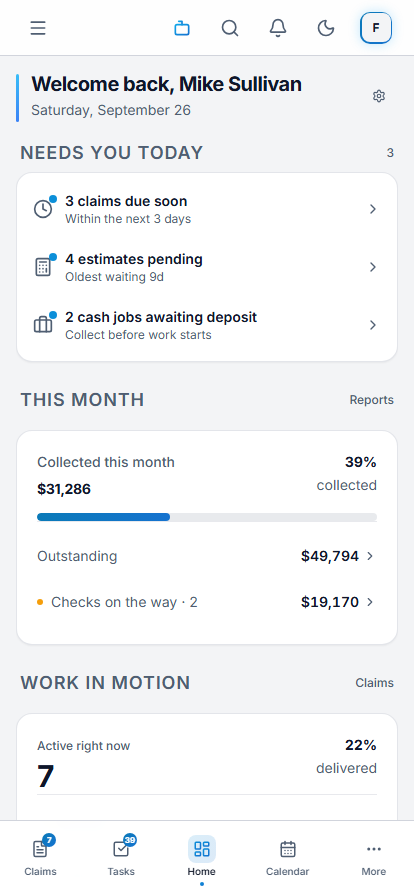

Common questions
Related tutorials
Ready to run your shop on Claimory?
Start a free 14-day trial. No credit card. The full Professional feature set, and an office manager onboarded in about 30 minutes.
No credit card. Works with CCC ONE and Mitchell.