
The customer's attorney, off the shop's phone
Claimory lets a collision repair shop share a claim with the customer's attorney once the customer asks for it. The shop picks what to hide, and the law firm follows the repair in its own free attorney portal instead of calling the front desk for updates.
The customer asks
Send to attorney on a Claimory claim starts with a tick: The customer asked me to share this claim with their attorney. Until it is ticked, Claimory shares nothing.
Pick the firm
The shop finds the attorney in the Claimory directory by name, firm or city, or types the attorney's email. An attorney not on Claimory yet gets a free account invite.
Choose what to hide
Everything on the claim is shared unless the shop switches a section off or hides single files. Internal notes, Claim Audit, customer portal links and the shop's checklist are never shared.
Everything on this claim is shared.
Customer
Name, phone, email, contacts
Vehicle
Year, make, model, VIN, plate
Insurance
Carrier, claim and policy numbers, adjuster, deductible
Repair progress
Status, stages, ETA
Notes and updates
Internal notes are never shared
Tasks
Title, status, due date
Financials
Costs, labor, payments, invoices and profit
Estimates and supplements
Versions, totals, supplement status
Files
Photos, estimates and documents
The firm follows the repair
The law firm signs in to its own free Claimory attorney portal and sees the claim kept current as the repair moves. Its messages and document requests land on the claim, and on Professional and up a request also becomes a task for the shop.
- A free account in the Claimory attorney portal
- The claim kept current as the repair moves
- One message thread with the shop for each claim
- Request a document, which reaches the shop in the claim's thread

Every firm and every shared claim, on one page
The Claimory Attorneys page lists the law firms a shop works with and every claim it has shared, with the open requests and unread messages counted at the top. Each shared claim shows where the share stands, from invite emailed to connected.
When a firm asks for a document in Claimory, the request lands on the claim as a message (and, on Professional and up, as a task), and the team gets a notice. The shop uploads the file or marks the request done from the same thread.
Work at a law firm? See Claimory for attorneys.
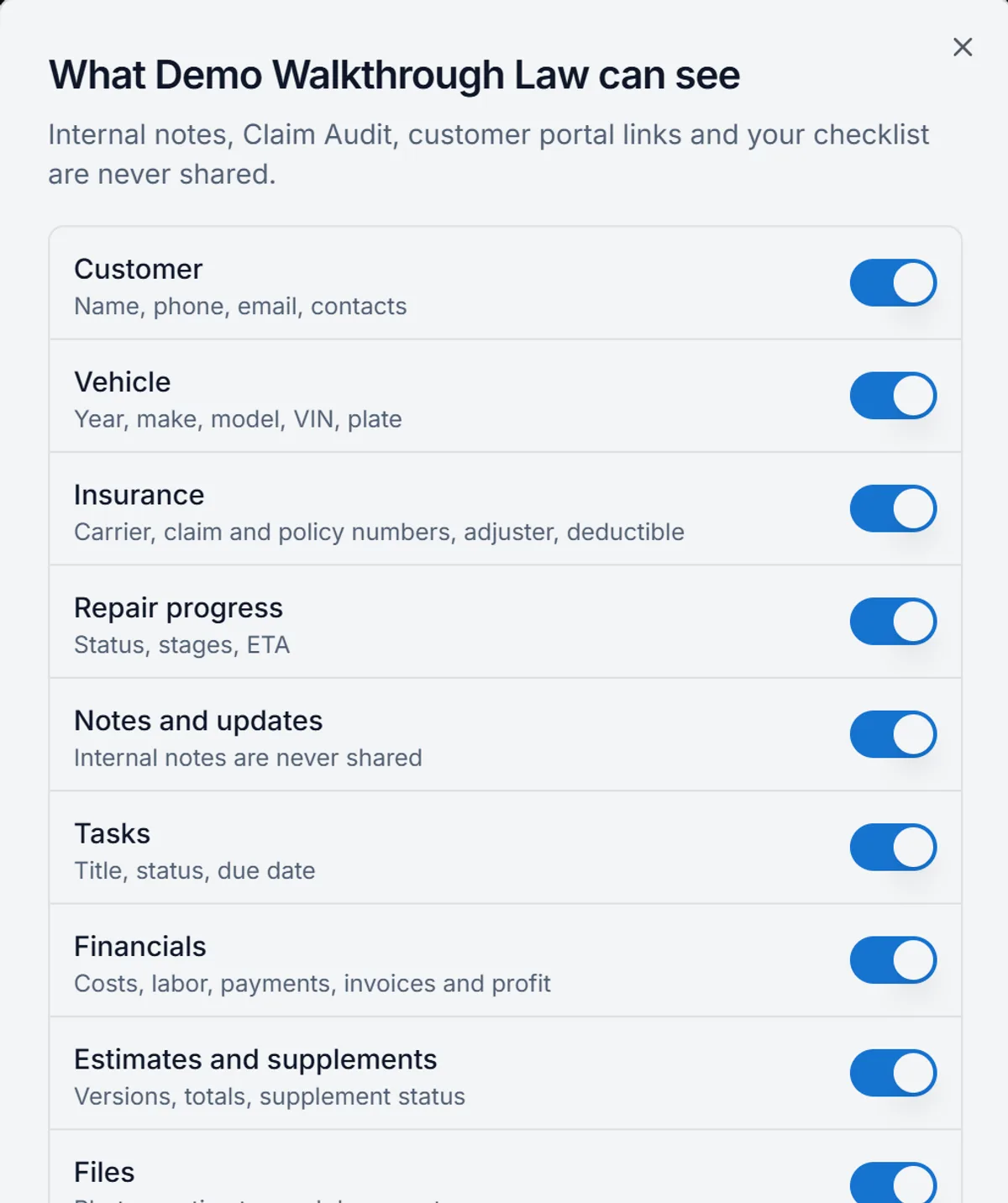
Nine switches and a box per file, changed any time
What they can see in Claimory opens from the firm's name in the claim's actions menu. Each of the nine sections has its own switch, from Customer and Vehicle through Insurance, Repair progress, Notes and updates, Tasks, Financials and Estimates and supplements to Files.
Under Files, every file on the claim has its own checkbox and the folder it sits in, so a shop can share the photos and the signed repair authorization while keeping one document back. The top of the dialog says it plainly: internal notes, Claim Audit, customer portal links and the shop's checklist are never shared.
A change takes hold for the law firm right away. Files the firm already had open may stay open for a few minutes, and after that the firm sees only what the shop left shared. Stop sharing ends the share for that claim.
Both sides of the share, in one place
Attorney sharing in Claimory involves people inside the collision repair shop and two people outside it: the customer who asks for it and the law firm that reads the claim.
Inside the shop
- Front office
- The front office sends the share from the claim's actions menu, answers the firm's messages in one thread on the claim, and clears the firm's document requests by uploading the file or marking the request done. The Attorneys page counts the open requests and unread messages, so nothing a firm asked for waits in an inbox.
- Owner or manager
- The owner or a manager decides how much of the money a firm sees. Financials can only be shared by someone in the Claimory shop who is allowed to see financials, and What they can see or Stop sharing changes the share at any time.
- Estimator
- The estimator's work travels with the claim. With Estimates and supplements switched on, the firm sees the estimate versions, the totals and the supplement status in Claimory, so the estimator is not the one emailing PDFs every time a supplement is approved.
Outside the shop
- The customer
- The customer starts it. A Claimory shop shares a claim with a law firm only after ticking that the customer asked for the claim to be shared with their attorney, and until that box is ticked, Send stays off. The share starts with the customer's word, not the law firm's.
- The law firm
- The attorney signs in to a free Claimory attorney portal with Shops, Firm and Messages, reads the claim as the repair moves, and asks the shop for a document from there. Each request reaches the shop in the claim's thread, and on Professional and up as a task too.
Fewer calls, fewer attachments
- Calls from the law firm asking where the car isRepair progress the firm reads in its own Claimory portal
- Photos and estimates emailed one attachment at a timeFiles shared once, with new files showing up for the firm on their own
- A document request lost in the front office inboxA request that lands on the claim as a message (and a task on Professional and up)
- No list of which firm has which claimThe Attorneys page, with every firm and every shared claim
The limits of a share
- Claimory shares nothing until the shop ticks that the customer asked for the claim to be shared with their attorney.
- Internal notes, Claim Audit, customer portal links and the shop's checklist are never shared, whatever is switched on.
- Financials can be shared only by someone in the shop who is allowed to see financials.
- After a change or Stop sharing, files the firm already opened may stay open for a few minutes.
- Claimory is not a law firm and gives no legal advice. It shares the claim the shop chooses to share.
Related Claimory pages
- Claimory for attorneys
The page for law firms: the free attorney portal and what a firm sees.
- Customer portal
The customer's own view of the repair, kept apart from the firm's.
- Claims management
The claim page every share starts from.
- Claim Audit
Estimate review that stays inside the shop and is never shared.
- Shop SOP checklist
The shop's repair steps on every claim, also never shared.
Let the attorney see the claim
Try Claimory free for 14 days, no credit card.