
Your body shop email and your claims. One screen, one login.
Connect the Gmail or Google Workspace inbox your shop already uses. Claimory sorts adjuster, customer and vendor email and files it to the right claim, so your team reads and answers it from the same screen that runs the shop.
No credit card. On Professional, Elite and every trial.
Six logins become one screen
The adjuster's email in one tab, the claim in another, the calendar in a third. Claimory puts a collision repair shop's email, claims, calendar, tasks, files and customer updates behind one login per person. Keep CCC ONE, Mitchell or Audatex for the estimate.
- Email inbox
- Claim spreadsheet
- Calendar app
- Task list
- Photo folder
- Customer messages

Claimory, one login
- EmailAdjuster, customer and vendor mail, filed to its claim
- ClaimsCarrier, supplements and payments on one record
- CalendarDeliveries, appointments and follow-ups
- TasksWho does what, and by when
- Photos and filesOn the claim, not on someone's phone
- Customer updatesOne link, with no login for the customer
What happens when an email lands
Claimory sorts the email, finds its claim and offers a reply. A person at the shop reads it and sends it.
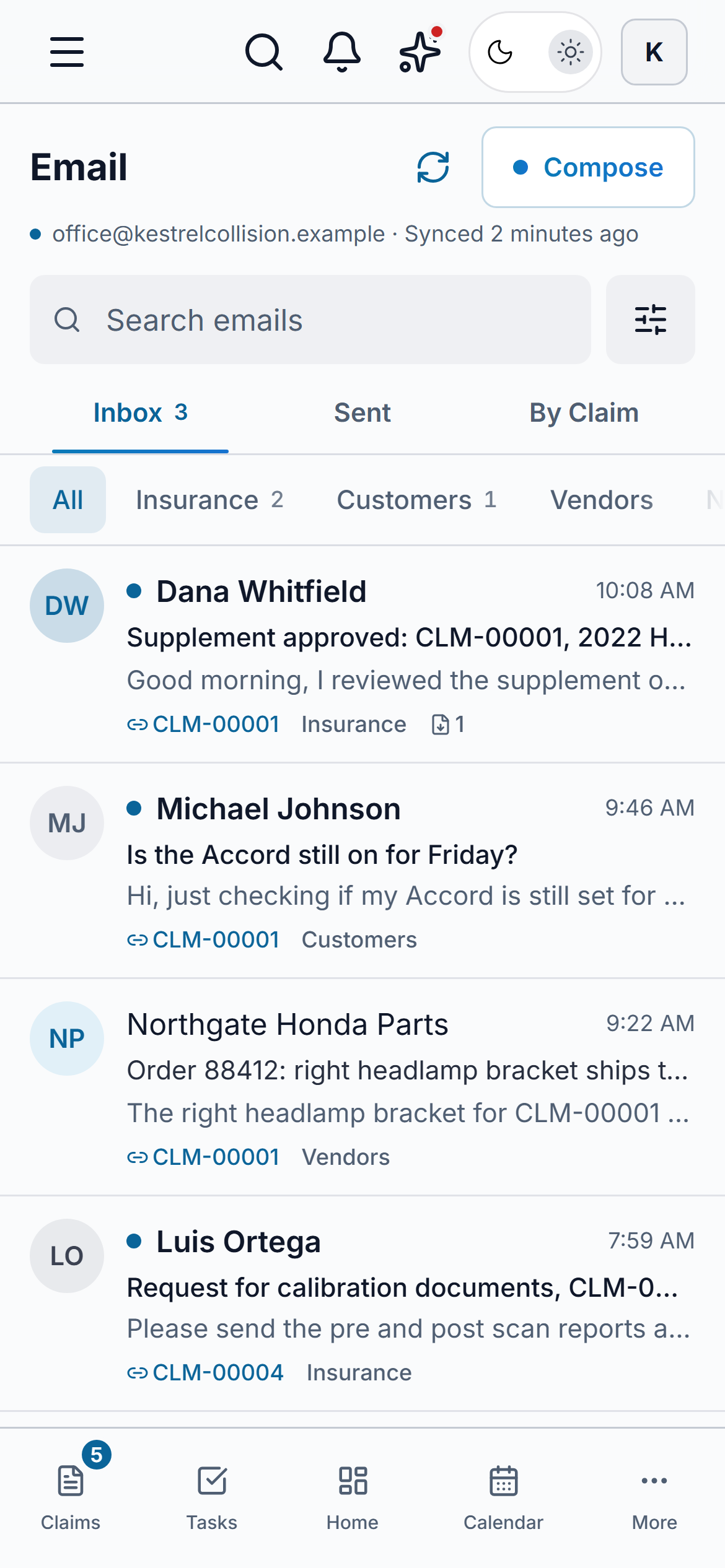
The inbox sorts itself
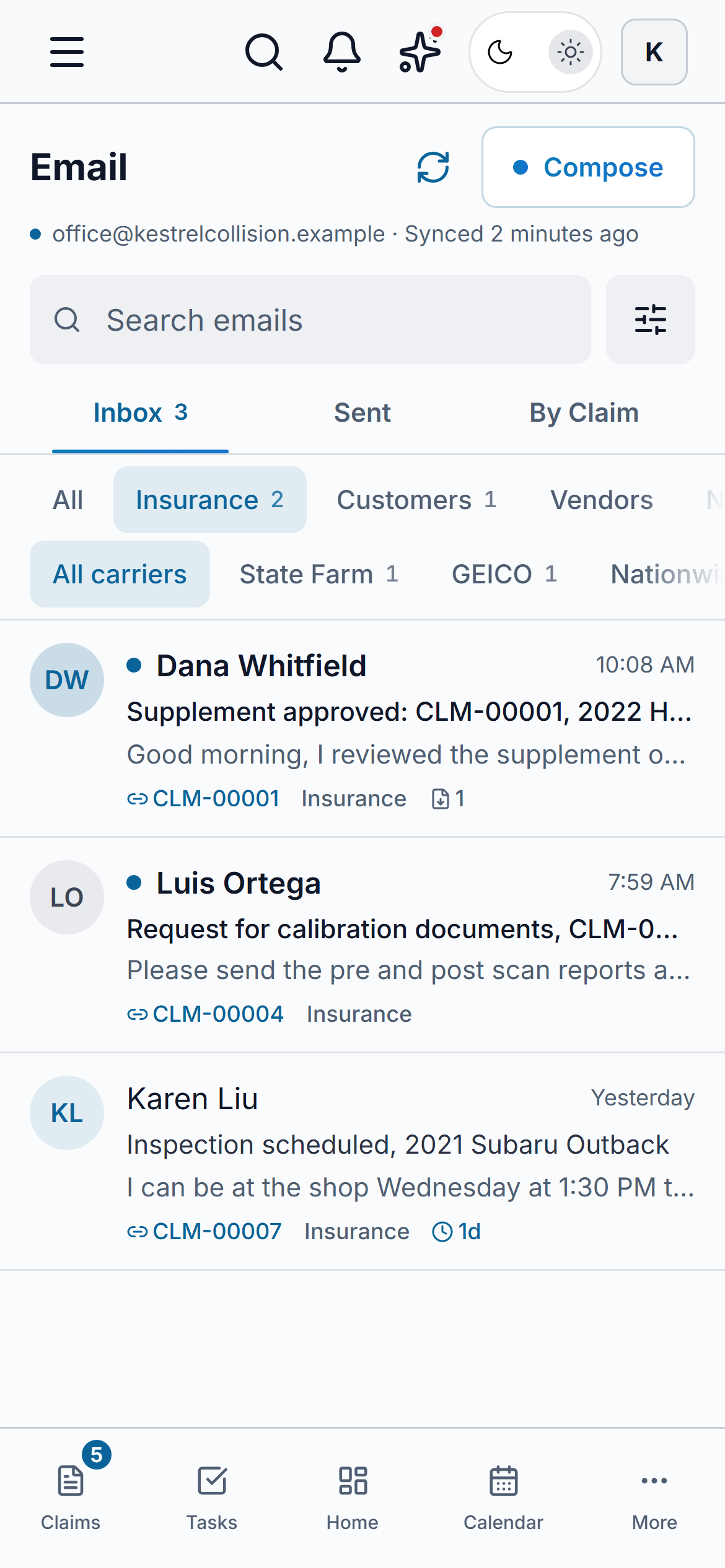
Claimory files each body shop email into Insurance, Customers, Vendors, Internal or Other, with a folder for each insurance carrier. It works the first day, on 323 built-in patterns and no setup.
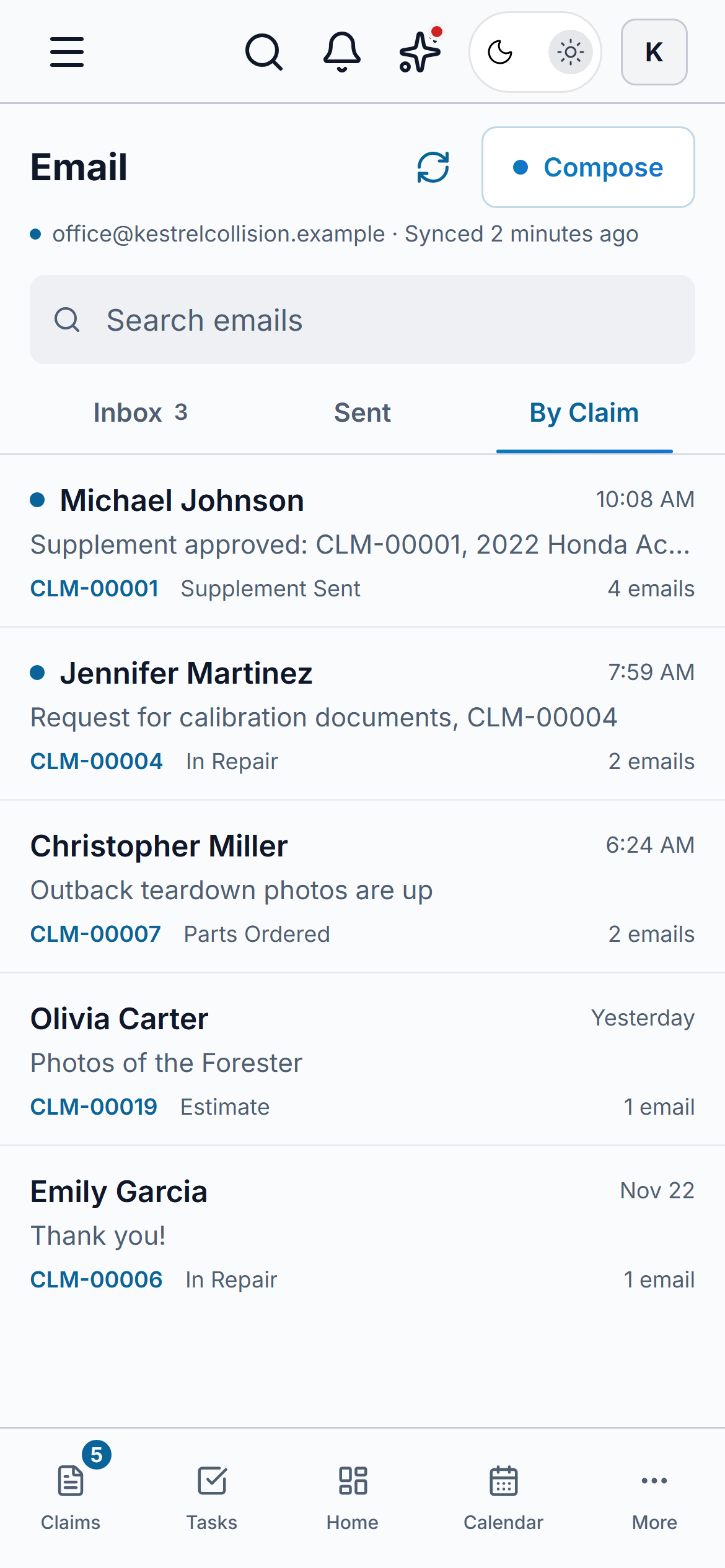
Each email finds its claim
Claimory reads the claim number and the sender, then links the email to the claim. The By Claim view lists every claim with mail, and opening one shows that claim's emails in date order.
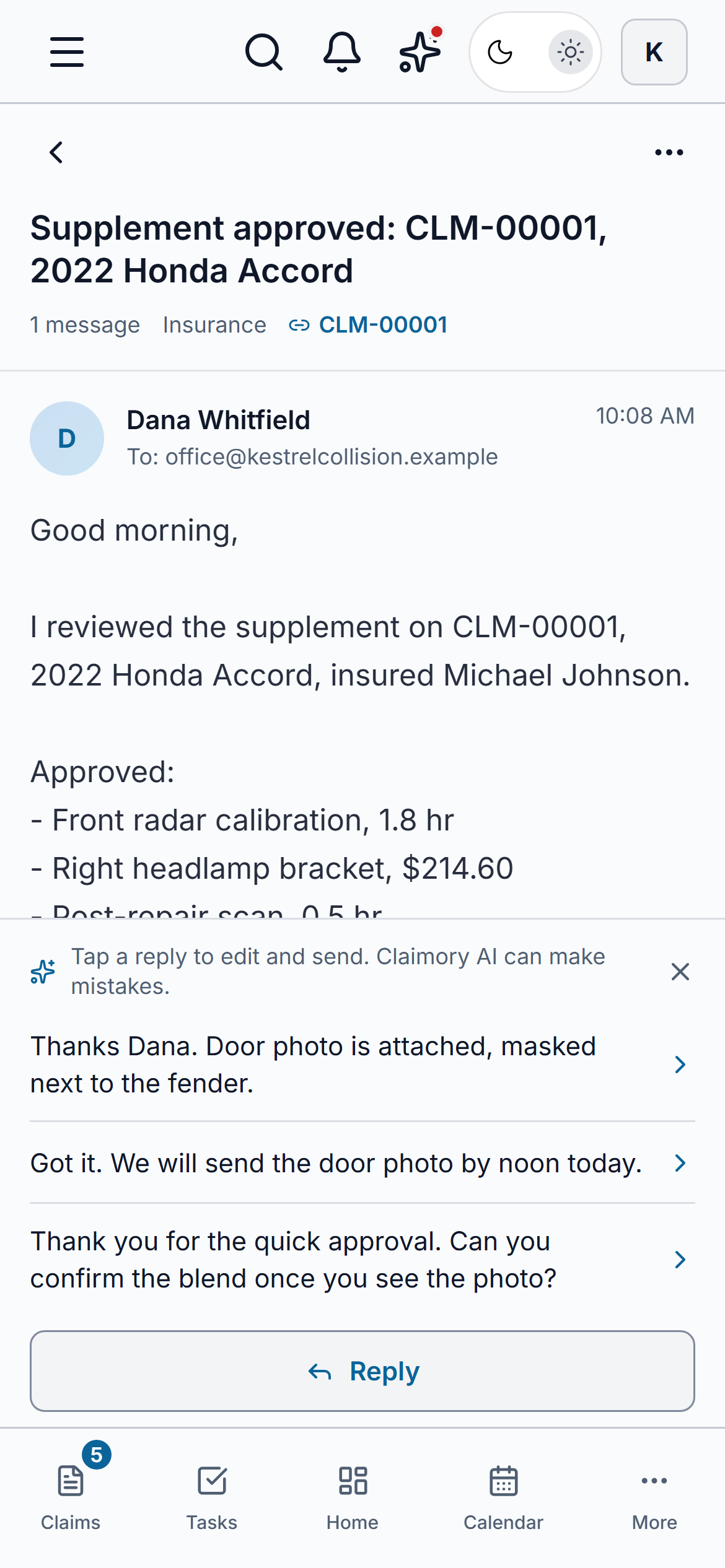
The reply is one tap away
Claimory AI offers three short replies to an adjuster or customer email: one acknowledges, one asks for what is missing, one sets the next step. Pick one, edit it and send it from your shop's own address.
How Claimory matches an email to a claim
Claimory rates how sure it is of every match. At 85% and above it links the email to the claim for you. Between 50% and 85% it asks you to confirm with one tap. Below 50% it leaves the email alone.
- Claim number or carrier claim number found in the mail98% sureLinked for you
- Number matches one of the claim's additional claim numbers95% sureLinked for you
- Customer email, and exactly one claim uses it85% sureLinked for you
- Adjuster email, and exactly one claim uses it70% sureYou confirm with one tap
- Customer email, several claims share it60% sureYou confirm with one tap
- Adjuster email, several claims share it55% sureYou confirm with one tap
The eight checks that sort an email, in order
- Known notification domains stop here. A message from a notification sender is filed as Other before any other check runs. This is why a LinkedIn digest with the word claim in its subject never reaches your insurance folder. 28 domains.
- Insurance by sender domain. The strongest signal. 131 carrier domain patterns, so mail from an adjuster at a carrier address is insurance before anything reads the subject.
- Insurance by display name. Carriers often send through a third-party platform, so the domain gives nothing away. 54 display-name patterns catch Allstate Claims Center arriving from a generic portal address.
- Insurance by subject keyword. 28 collision-specific keywords: supplement, appraisal, total loss, deductible, subrogation, reinspection, teardown, betterment, assignment, prior authorization.
- Vendor by sender domain. 36 parts and paint supplier domain patterns, so the parts desk and the jobber land in Vendors rather than in the middle of your carrier mail.
- Vendor by subject keyword. 14 keywords for a supplier you have never emailed before: purchase order, back order, tracking number, credit memo, paint supply, ETA.
- Customer by consumer host plus a customer phrase. A consumer mail host on its own is not enough. Claimory needs one of 15 customer phrases in the subject or the first 2000 characters of the body: my car, my claim, rental, drop off, deductible, status.
- Internal, same domain as this mailbox. Mail from your own domain is filed as Internal, so a note between the estimator and the office manager does not sit in the same pile as a carrier deadline.
When an email counts as needing a reply
- It came in, it is not ignored, and nobody has marked it handled.
- It is the newest inbound message in its thread, so one slow thread is one row, never a pile of them.
- No reply has gone out on that thread since it arrived.
- For mail with no thread id, no later message of yours is addressed to that sender.
Built for adjuster email
A normal inbox does not know what a supplement is. Claimory email sits on the claim, so it does.
Needs Action list
Claimory lists every email still waiting on your shop with the days it has waited, oldest first. A daily reminder raises anything past three days, or the limit you set.
Inbox rules
Match a sender, a domain or a phrase in the subject, then file the email, assign it to a teammate or ignore it. No rule sends an email.
Templates with claim details
Save the supplement follow-up and the authorization request once. Claimory fills in the claim number, adjuster, customer, vehicle and shop name.
Drafts from the claim
Claimory AI writes a full email from the claim, its supplement lines, its files and the earlier thread. A person reads it and presses send.
Thread summaries
A claim's whole email history in three to five sentences, with the open action items and any deadline written as a real date.
Scheduled sends
Queue an email for later, and change your mind any time before it goes.
Attachments behind your login
Files a carrier sends are copied into private storage, up to 25 MB each, and one tap saves an attachment to the claim. Outgoing files go up to 20 MB.
Search and response times
Search all mail, filter by read state or date, and see inbound, outbound, average response time in hours and your top senders.
Your address, your signature
Replies leave from the mailbox you connected, with a signature for each mailbox. An address that bounces or opts out is blocked from the next send.
Connect Gmail in three steps
Keep your address. Mail keeps arriving where it always did, and Claimory shows it beside the claim.
- 1
Create an app password in Google
In your Google Account, with 2-Step Verification on, create an app password for Claimory. Your normal password never leaves Google.
- 2
Paste it into Claimory
Enter the shop's Gmail or Google Workspace address and the app password. There is no SMTP setup, no forwarding rule and no new address to hand out.
- 3
Open the Email tab
Claimory pulls in the last 500 messages, sorts them, matches them to claims, and then checks for new mail every five minutes.
Works with the inbox you have
- GmailConnects now
- Google WorkspaceConnects now
Connect more than one Gmail mailbox and read them in one unified inbox.
Your shop stays in control
Your team presses send
Rules sort, assign and file the mail. Claimory AI drafts the reply. A person at the shop reads every email and sends it.
Customers sign on their phone
Claimory sends a signing link. The customer taps it and signs on a Claimory page from their phone, with no print, sign and scan.
Adjusters in one contact book
Contacts keeps the adjusters, insurers, vendors and customers the whole shop shares. Turn on automatic saving and the adjuster on each claim is added when the claim has their phone or email.
Included on Professional and Elite
Email comes with Professional, Elite and the 14-day trial. Sorting, claim matching, carrier folders and reply reminders run on every email with no AI. Thread summaries, smart replies and full drafts use the plan's AI allowance.
Body shop email questions
Can a body shop run its email and its claims from one screen?
Yes. Claimory puts a collision repair shop's email on the same screen as its claims, calendar, tasks, files and customer updates, behind one login per person. The shop connects its Gmail or Google Workspace inbox once, and adjuster, customer and vendor email sorts itself and files to the claim it belongs to. The insurance estimate is still written in CCC ONE, Mitchell or Audatex.
How do I connect Gmail to my body shop software?
To connect Gmail to Claimory, turn on 2-Step Verification in the Google Account, create an app password, and paste the Gmail address and that app password into Claimory. Claimory pulls in the last 500 messages, sorts them, matches them to claims, and checks for new mail every five minutes. Google Workspace mailboxes connect the same way.
Which email accounts connect to Claimory?
Claimory connects Gmail and Google Workspace mailboxes with an app password from the Google Account. A body shop can connect more than one mailbox and read them in one unified inbox.
How do I keep adjuster emails attached to the right claim at my body shop?
In Claimory, an adjuster email attaches to its claim on its own. Claimory reads the subject and body of each email in the shop's connected Gmail for the claim number or carrier claim number and links the email to that claim. When only the adjuster's address matches, Claimory suggests the claim and a person confirms it with one tap. The By Claim view then lists every claim with email, each with its full email history in date order.
How do I organize all the emails with insurance adjusters at my body shop?
Claimory organizes insurance adjuster email by carrier and by claim. The collision repair shop connects the Gmail or Google Workspace account it already uses with an app password, and Claimory files adjuster email into an Insurance folder with a folder for each carrier, links it to the claim it belongs to, and lists every email still waiting on a reply with the days it has waited.
What do I do when the insurance adjuster is not responding?
Claimory keeps the follow-up on the claim. The By Claim view shows every email sent to and received from the insurance adjuster on that claim, with dates, and a phone call goes on the claim's Activity tab as a dated note. Ask Claimory AI on the claim to draft the follow-up email, and it writes from the claim's notes, its supplements and the adjuster saved on the claim, asking for any fact the claim does not hold rather than inventing one. A person at the shop approves the email before Claimory AI sends it, and while the claim sits at its Estimate or Supplement Approved stage, the gauge on the customer's Claimory page reads Waiting on insurance.
Does Claimory have a contact book for adjusters?
Yes. Contacts keeps adjusters, appraisers, insurers, vendors and customers in one book the whole shop shares, with a list just for adjusters. Turn on automatic saving and the adjuster on each claim is added for you when the claim has a phone number or an email for them. Contacts comes with Professional, Elite and the 14-day trial.
Which Claimory plans include email?
Professional at $129.99 a month per location, Elite, and the 14-day free trial include Claimory email with more than one Gmail mailbox. Email is part of the main Claimory app, with no add-on to buy.
Can my shop answer email from a phone?
Yes. The Claimory email page works on a phone, with the same Inbox, Sent and By Claim views, folders, search and suggested replies as on a computer, and replies go out from the shop's own address.
Do I have to move to a new email address?
No. You connect the Gmail or Google Workspace account your shop already uses, with an app password from your Google Account. There is no SMTP setup and no forwarding rules. Mail keeps arriving where it always did, and replies you send from Claimory go out from that same address, so adjusters and customers see the shop address they already have.
How does Claimory know which claim an email belongs to?
Four signals, scored. A claim number or carrier claim number found in the subject or body scores 98%. A number matching one of the claim's additional claim numbers scores 95%. A customer email address used by exactly one claim scores 85%. An adjuster address used by exactly one claim scores 70%, and a customer or adjuster address shared by several claims scores 60% or 55%. At 85% and above Claimory links the message itself. Between 50% and 85% it offers a one-tap suggestion for you to confirm. Below 50% it leaves the message unlinked.
Does the claim matching cost anything to run?
No. Claim matching is deterministic: five regular expressions for claim numbers plus a lookup on the customer and adjuster addresses already on the claim. No model is called, so it carries no AI cost and it runs on every message whether or not your plan includes AI.
Do I have to set up rules before my inbox sorts itself?
No. Sorting works out of the box against 323 built-in patterns covering carrier domains, carrier display names, collision subject keywords, parts and paint supplier domains, consumer mail hosts and known notification senders. Rules exist to override that when you want to, not to make it work.
What can a rule actually do?
A rule matches on the exact sender, the exact domain or any subdomain of it, a phrase in the subject, or a general match of sender, domain or subject using contains, starts with, ends with or exact. When it matches, it can file the message into a category, assign it to a teammate, or ignore it. Rules run in the priority order you set and the first match per action wins. A rule can point at a template, but the template is offered as a suggestion in the composer and is never sent for you.
Will a rule overwrite work my team already did?
No. Before assignment rules run, Claimory checks which of the incoming messages already carry an assignment and leaves those alone. Rules assign new mail only, so re-syncing an inbox never takes a message off the person who claimed it.
How does Claimory decide an email needs a reply?
A message needs a reply when it came in, is not ignored, is not marked handled, and is the newest inbound message in its thread, and no reply of yours has gone out on that thread since. For mail with no thread id, a later message of yours addressed to that sender counts as the reply. Each one shows how many days it has been waiting, and the list runs oldest first.
Does the reply reminder need setting up?
No. The threshold is three days unless you change it, and a workspace with no setting at all is treated as switched on at three days. A daily job collects everything past the threshold and raises it in the app. You opt out rather than opt in.
How often does mail come in?
Every five minutes. The first sync after you connect an account pulls the last 500 messages so the history is there, and later syncs pull the newest 50 from where the last one stopped. Gmail's Promotions, Social and Updates tabs are left out unless you switch them on.
What happens to attachments a carrier sends?
Claimory downloads each one during the sync and stores the bytes in a private bucket, so the saved record points at a path behind your login rather than at an unauthenticated provider link that anyone with the URL could open. Files up to 25 MB are stored, filenames are sanitized, and forwarding a message re-attaches the originals from that private copy.
Close the other tabs. Start here.
Connect your Gmail on the 14-day trial and watch the adjuster emails file themselves. No credit card.
See also claims management, supplement tracking and the customer portal.
Compare every plan