
Claim invoices and profit on every job
The Financials tab of a claim puts what the insurer pays beside what you spend. Upload the insurance estimate once and Claimory works out the margin as you log costs.
- 5 min read
- Professional and up
- Owner, Manager, Estimator
What you get
- The estimated payout and margin on one claim
- Your estimate against your real costs, category by category
- Invoices you can change, and payments recorded against them
Before you start
- Total cost, Received and Pending are on every plan. Profit, margin and reading an estimate start on Professional, and are open during your free trial.
- A role that can see financials. Changing anything needs edit financials.
- The insurance estimate as a PDF.
- Making invoices uses the Financial Center add-on, which comes with Elite.
Step by step
0 done of 7 steps
Read the money tiles
Open the claim and press Financials
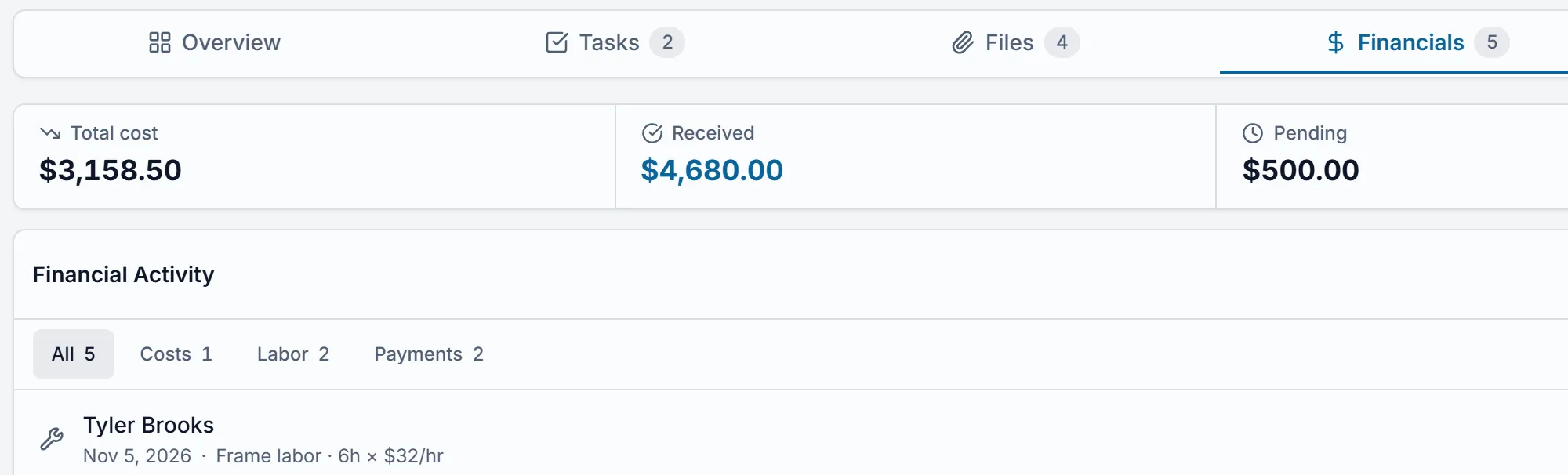
The tiles across the top add up everything logged on the claim.
- Total cost: every cost plus every labor line.
- Received: payments marked Received or Deposited.
- Pending: payments you are still waiting on.
- Received minus costs: shows until the claim has an approved total, an estimate or an issued invoice. Then the tile is called Profit, and counts the job's total minus your costs.
See your margin
Upload the insurance estimate
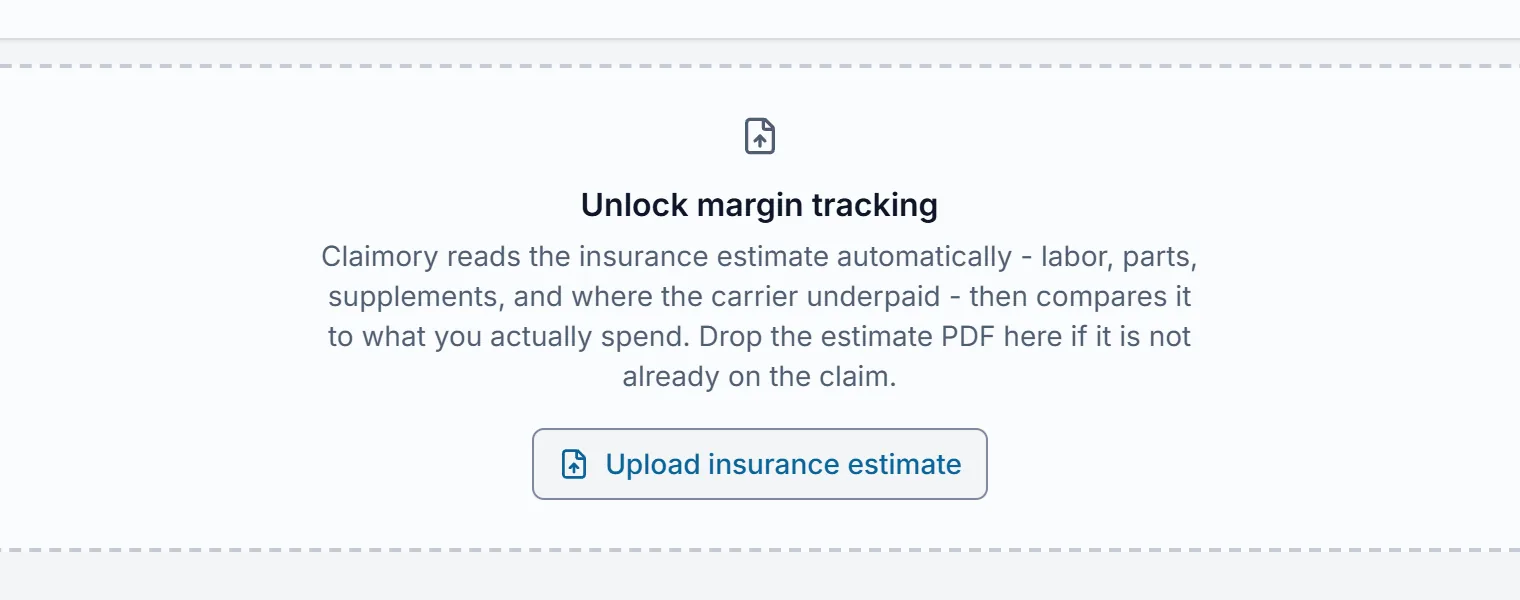
Under Unlock margin tracking, press Upload insurance estimate, or drop the PDF in the box. Claimory reads it in a few seconds and says Estimate read - margin tracking unlocked.
If an estimate PDF is already in the claim's Files tab, Claimory reads it by itself when you open Financials.
Read the headline number
Estimated payout is the carrier estimate, or the shop estimate until the carrier's is in, plus approved supplements. Once you log a cost it becomes Estimated margin: the payout minus what you spent. Over the estimate means the job cost more than the payout.
Press Show full breakdown
Three panels open under the headline. Press Hide full breakdown to close them.
- Estimate Intelligence: the estimate split into Labor, Parts, Materials, Sublet, Tax and Other, and how much higher or lower your estimate is than the carrier's.
- Estimate vs Actuals: the estimate beside what you spent, with a Variance for each category.
- Supplement Timeline: each supplement with Requested, Approved, its status and a running total.
Invoices on the claim
Make the invoice
With the Financial Center add-on, open Financial Center in the menu and press Receivables. Find the delivered job under Ready to invoice and press Create drafts. The invoice then shows on the claim's Financials tab as a Draft.
Change an invoice
On the claim's Financials tab, press the invoice line. Edit Invoice opens with Invoice #, Due Date, Description, Amount and Notes. Press Update Invoice.
Record a payment on an invoice
Press the dollar sign on the invoice line. Claimory shows Invoice Total, Already Paid and Remaining. Type the Payment Amount and press Record Payment.


Questions and fixes
How does Claimory work out profit on a claim?
Profit is the job's total minus Total cost. The total comes from issued invoices when there are any, then the approved total, then the estimate plus approved supplements.
What is Estimate Intelligence in Claimory?
Estimate Intelligence reads the carrier or shop estimate on a claim and splits it into Labor, Parts, Materials, Sublet, Tax and Other. With both on file, it says how much higher or lower your estimate is than the carrier's.
What do On budget, Under budget and Over budget mean in Claimory?
Estimate vs Actuals compares the estimate, with approved supplements added, against what you logged. Over budget means the claim has cost more than the estimate so far.
Which statuses can a supplement have on the Supplement Timeline?
Claimory shows Draft, Submitted, Under review, Pending review, Approved, Partially approved, Denied, Rejected or Revised.
Can I ask a customer to pay without making an invoice?
Yes. On the claim press More actions, then Send Payment Link. Claimory saves the request on the claim as Pending.
Profit and margin per claim is locked
Profit and margin per claim starts on Professional. Open Billing and choose Professional. The claim's totals and payments stay on every plan.
Estimate import starts on Professional
Open Billing and choose Professional, and the labor, parts and totals fill in from a CCC ONE, Mitchell or Audatex estimate.
Please upload the estimate as a PDF
Print or save the estimate as a PDF in your estimating platform, then press Upload insurance estimate again.
Could not read that estimate. Try a clearer PDF.
Get the original PDF from the estimating platform in place of a scan or a photo, then upload that one.
No carrier or shop estimate parsed yet
The PDF on the claim was a supplement or a scan report. Upload the carrier estimate to the claim's Files tab and Claimory has a payout to measure from.
No costs logged yet
Estimate vs Actuals needs something to compare. Press Add Cost or Log Labor on the Financials tab.
No estimate data to compare
Upload the carrier estimate PDF to the claim's Files tab. When Claimory has read it, Estimate vs Actuals and the breakdown fill in.
No supplements filed
Open the claim's Supplements tab and create one. The Supplement Timeline fills in on its own.
Issue this invoice first
The invoice is still a draft. Open Financial Center in the menu, press Receivables, open the draft and press Issue invoice.
What to do next
- Log costs and paymentsLog parts costs, labor hours and checks on a claim in Claimory, mark a payment received or deposited, and fix or delete a line that is wrong.
- Financial CenterKeep your shop's books in Claimory: invoice delivered jobs, settle a short pay, enter and pay vendor bills, and see the profit on every closed job.
- Money Match and leaksCatch unbilled work in Claimory: match the estimate, parts and final invoice line by line, and see every claim with a profit leak in one list.
- Still stuck?Open the Support Center to find the fix or write to a person.